How to Switch Accounting Software in Ireland Without Losing Your Records (2026)
· By MyLedgerBook Editorial Team
Updated September 2026 · Based on current Revenue guidance
Changing accounting software can feel like a much bigger job than it really is.
You may have years of invoices, customers, expenses and tax records in your existing system. Even if you're unhappy with the software, the thought of moving everything can be enough to make you stay.
But switching accounting software doesn't necessarily mean transferring every transaction your business has ever recorded.
For many small Irish businesses, the key is choosing a sensible changeover date, preserving the historical records you're required to keep, and moving the information you actually need to continue operating.
Quick answer: Before switching accounting software, make a secure copy of your existing records, choose a clear changeover date and identify what needs to move to the new system. This may include customers, suppliers, open invoices, opening balances and VAT information. You don't necessarily need to recreate years of old transactions, but you must continue to retain the business and tax records Revenue requires.
Why do businesses change accounting software?
There isn't one reason.
A business may have outgrown its existing software.
Another may have the opposite problem: the software has become far more complicated than the business actually needs.
Common reasons for considering a switch include:
- rising subscription costs
- paying for features you don't use
- invoice or transaction limits
- complicated bookkeeping
- difficulty understanding VAT information
- poor receipt management
- needing better Irish tax functionality
- wanting simpler accountant collaboration
- wanting better access to your own data
- starting with spreadsheets and needing a proper accounting system
Sometimes the existing product is perfectly good software.
It simply isn't the right software for that particular business anymore.
If you're still comparing your options, read our Accounting Software for Small Businesses in Ireland guide.
Is switching accounting software difficult?
It depends on the business.
A sole trader issuing 20 invoices a month may have a relatively straightforward move.
A VAT-registered limited company with employees, stock, multiple bank accounts, foreign currency transactions and years of detailed accounting history will have more to consider.
The important thing is not to start moving information randomly.
Treat the switch as a changeover.
You have:
Old accounting system
↓
Agreed changeover date
↓
New accounting system
Once that date is clear, it becomes much easier to decide what belongs in each system.
When is the best time to change accounting software?
There is no single changeover date that works for every business.
Possible dates include:
- start of a new financial year
- start of a tax year
- start of a VAT period
- beginning of a month
- another clearly defined accounting date
Starting at the beginning of a financial or accounting period can make reconciliation easier because it creates a clean division between the old and new systems.
But waiting until year-end isn't always necessary.
If your current software is causing problems today, a mid-year switch may still be practical.
The more complicated your accounts are, the more worthwhile it is to discuss the changeover date with your accountant before moving.
Don't cancel your old software first
This is probably the most important practical rule in this guide.
Do not cancel access to your existing accounting system before you have secured the records you need.
Before cancelling, establish:
- what can be exported
- which reports can be downloaded
- whether invoices can be downloaded
- whether receipts and attachments can be exported
- how long your data remains available after cancellation
- whether read-only access remains available
- whether you need to retain anything that cannot easily be exported
Don't assume that because information is visible today it will remain available after your subscription ends.
Check the provider's current cancellation and data-retention policy.
What records should you save before switching?
Exactly what you need depends on your business, but consider exporting or securely saving:
- customer list
- supplier list
- sales invoices
- purchase invoices
- credit notes
- expense records
- receipts
- bank reconciliation information
- bank statements where stored
- aged receivables
- aged payables
- trial balance
- profit and loss reports
- balance sheet
- general ledger
- VAT reports
- VAT returns
- RTD information
- VIES information where applicable
- fixed-asset records
- payroll records if relevant
- year-end accounts
- tax-related reports
- supporting documents
You may not need to import all of these into the new accounting system.
But that doesn't mean you shouldn't retain them.
How long must Irish businesses keep accounting records?
Revenue states that businesses must keep records used for tax purposes and that the records should clearly show the accounting process.
These can include:
- receipts for expenses
- purchase receipts
- sales invoices
- nominal ledgers
- accounting books
Revenue's general guidance states that original business records should generally be retained for six years.
There are circumstances where records may need to be retained longer, including where a matter remains under Revenue inquiry, investigation, claim or appeal.
Switching software does not restart or remove those record-keeping obligations.
If five years of your accounting history is held in your old software, moving to a new provider doesn't mean that history can simply disappear.
What about VAT records?
VAT-registered businesses have additional record-keeping considerations.
Revenue requires full and true records of transactions that may affect VAT liability or entitlement to reclaim VAT.
Relevant records can include:
- invoices
- credit notes
- debit notes
- receipts
- accounts
- VIES records
- bank statements
- business books and records
Revenue also requires sales records to show every sale and the amount charged, with sales separated according to the relevant VAT rates, including exempt transactions where applicable.
That makes the changeover date particularly important for a VAT-registered business.
You don't want part of a transaction accidentally accounted for in the old system and another part in the new one.
For more information, see our VAT3 Ireland guide and RTD Ireland guide.
Should you switch at the start of a VAT period?
If you're VAT registered, the beginning of a new VAT period can be a convenient changeover point.
For example, if you file VAT on the normal bi-monthly cycle, a clean changeover at the beginning of a VAT period may make it easier to distinguish transactions handled in the old system from those recorded in the new one.
However, this is not a requirement that applies to every software migration.
A mid-period change can still be handled, provided the records and VAT position are transferred and reconciled correctly.
If you're uncertain, ask your accountant before choosing the changeover date.
Do you need to import all your old transactions?
Usually, not necessarily.
This is where many business owners make the switch sound harder than it needs to be.
Imagine you've been trading for six years.
That doesn't automatically mean your new accounting system needs six years of individual transactions recreated inside it.
You may instead retain the complete historical records from the old system and begin the new system from an agreed accounting position.
What needs to be brought forward will depend on the business.
It may include:
- customers
- suppliers
- open sales invoices
- unpaid supplier bills
- bank balances
- VAT balances
- opening ledger balances
- fixed assets
- money owed to or by the business
The important distinction is:
Retaining historical records
is not necessarily the same as:
Re-entering every historical transaction.
What customer information should you move?
If you regularly invoice existing customers, recreating every client manually can turn a simple switch into hours of unnecessary work.
Ideally, your new system should allow customer information to be imported.
That may include:
- customer or business name
- billing address
- email address
- phone number
- VAT number where relevant
- other invoicing information
Before importing data, it can also be a good opportunity to clean the customer list.
You may have:
- duplicate customers
- customers you haven't dealt with for years
- old email addresses
- outdated contact details
A software change can therefore double as a useful data tidy-up.
What happens to unpaid invoices when you switch?
This is one of the most important practical issues.
Suppose you change accounting software on 1 October.
On 30 September, your old system shows:
Invoice 1051 — €1,230 — unpaid
Invoice 1058 — €615 — unpaid
Invoice 1062 — €2,460 — unpaid
Those customers still owe the money after you switch.
Your new system needs an appropriate way of recognising those outstanding amounts if you want it to provide an accurate picture of what customers owe you.
This is why open invoices are often more important during a small-business migration than importing thousands of already-paid historical invoices.
What about partially paid invoices?
These require particular care.
Imagine an invoice was issued for:
€2,000
and the customer has already paid:
€750
The amount still outstanding is:
€1,250
If you migrate that invoice incorrectly as €2,000 outstanding, your new system will overstate the customer's debt.
Open invoices should therefore be checked against the actual outstanding balances before migration.
The same principle applies to credit notes and customer overpayments.
What about unpaid supplier bills?
If your accounting system records amounts you owe suppliers, these also need consideration.
At the changeover date you may have:
- unpaid supplier invoices
- partially paid supplier invoices
- supplier credits
- expenses incurred but not yet paid
Whether these need to be imported individually or reflected through opening balances depends on the new software and your accounting setup.
This is another area where an accountant can help with a more complex migration.
What happens to invoice numbering when you change software?
This is a small detail that can become a major annoyance if you only discover it after switching.
Revenue's current VAT invoice requirements state that a VAT invoice must contain a unique sequential number.
Suppose your last invoice in your old system is:
Invoice 1847
You probably don't want the new system automatically producing:
Invoice 1
Instead, check whether the new software allows you to choose an appropriate starting invoice number.
For example:
Old system
Invoice 1845
Invoice 1846
Invoice 1847
New system
Invoice 1848
Invoice 1849
Invoice 1850
This makes the transition much cleaner.
If you use multiple invoice sequences or have unusual invoicing requirements, check these carefully before issuing invoices from the new system.
For the information required on Irish VAT invoices, see our VAT Invoice Requirements Ireland guide.
Should you delete old customers and records?
Don't confuse cleaning your new customer list with destroying accounting records.
You may decide not to import an inactive customer into your new day-to-day customer list.
That doesn't necessarily mean invoices and accounting records relating to that customer should be deleted from your retained historical records.
The purpose of migration is to create a clean working system while preserving the records you're required to retain.
What reports should you run on the changeover date?
Before moving, it can be useful to produce a snapshot of the old system.
Depending on your business, this could include:
Aged receivables
Who owes you money?
Aged payables
Who do you owe?
Bank balances
What should each account contain?
VAT position
What VAT has been accounted for up to the changeover date?
Trial balance
What are the accounting balances being carried forward?
Profit and loss
What has happened in the business during the current accounting period?
Balance sheet
What does the business own and owe at the changeover date?
Not every sole trader will need every report.
But for a limited company or a more developed set of accounts, these can provide an important reconciliation point.
Should your accountant be involved?
For a simple business, you may be able to handle much of the practical migration yourself.
But consider involving your accountant if:
- you're switching during a financial year
- you're VAT registered
- you have significant unpaid invoices or supplier bills
- you have multiple bank accounts
- you use accrual accounting
- you hold stock
- you have fixed assets
- you have payroll
- you operate in multiple currencies
- you're unsure about opening balances
- your year-end is approaching
A short conversation before the switch may save considerable work later.
Your accountant can also tell you which reports they want preserved from the previous system.
How do you check that the migration worked?
Don't assume an import was successful simply because the software says:
Import complete.
Perform some basic checks.
Compare the old and new systems at the changeover date.
Check:
- number of customers imported
- customer details
- outstanding invoices
- amounts still due
- supplier balances where relevant
- opening bank balances
- VAT balances
- invoice numbering
- accounting opening balances
- key totals
Open a few imported records manually.
If an old system says a customer owes €1,250, the new system shouldn't say €2,000.
Migration is much easier to correct before you start adding new transactions.
Should you run both systems at the same time?
A short overlap can be useful.
It gives you time to:
- confirm that the new system is configured correctly
- check imported information
- learn the new workflow
- verify reports
- make sure invoices look right
- confirm your accountant can access what they need
But avoid maintaining two complete live accounting systems indefinitely.
That can create its own problem:
Which one is correct?
Once you've verified the changeover, establish which system is the live accounting record from the agreed date.
What should you test before cancelling the old system?
Before you finally cancel, make sure you can answer yes to the important questions:
- Have I exported the historical records I need?
- Have I retained invoices and receipts?
- Have I saved relevant VAT reports?
- Do I know my changeover date?
- Are my open invoices correct?
- Are my opening balances correct?
- Can I access the reports my accountant needs?
- Is my invoice numbering correct?
- Have I checked the first transactions in the new system?
- Do I know how long I must retain the old records?
Only then should cancelling the previous software become part of the plan.
What if you're moving from spreadsheets?
The same principles apply.
Your spreadsheet may not charge a monthly subscription, but it is still your existing accounting system.
Before moving, preserve copies of:
- sales records
- expense records
- customer information
- outstanding invoices
- VAT calculations
- supporting receipts and invoices
- bank reconciliation records
- tax calculations
Then choose a clear starting date for the new accounting software.
Moving from spreadsheets can actually be an excellent opportunity to stop duplicating work.
Instead of:
Create invoice → update sales spreadsheet → update VAT spreadsheet → update unpaid invoice list
a properly configured accounting system can create those records from the original transaction.
What if you're moving from Xero, QuickBooks, Sage or another accounting platform?
The migration principles remain the same regardless of brand.
First determine:
What do I need to retain?
Then:
What do I need to continue operating?
Then:
What needs to be imported?
Finally:
What needs to reconcile at the changeover date?
Don't choose your new accounting software solely because it has the longest list of features.
Consider whether the new system actually removes the problem that caused you to consider switching in the first place.
How does MyLedgerBook make switching easier?
MyLedgerBook is built for Irish sole traders, freelancers, tradespeople and small limited companies.
It also supports businesses that already have customers and invoices in another system.
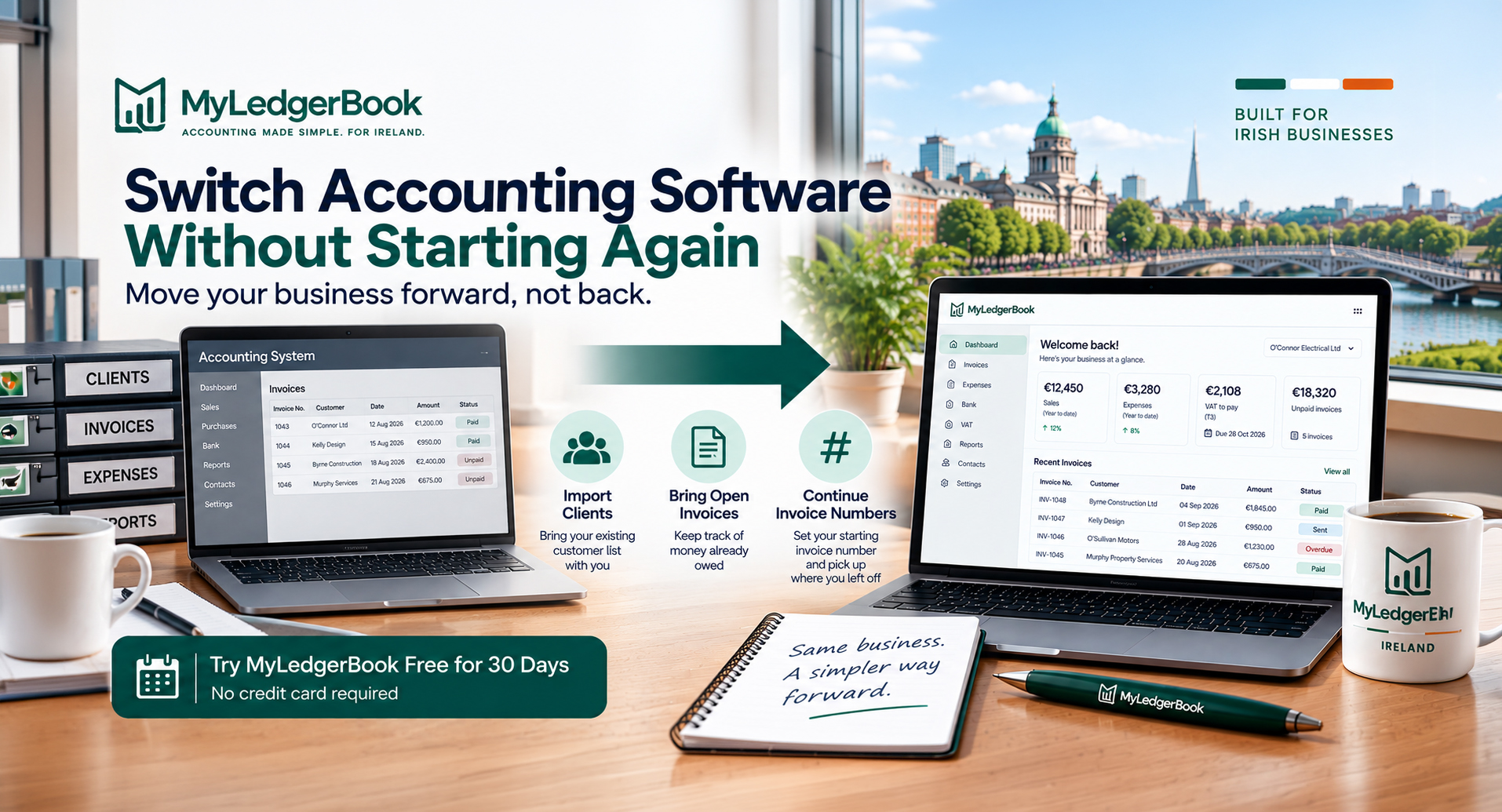
When moving to MyLedgerBook, you can:
- import your existing clients
- import your open invoices
- set the starting number for new invoices
That means you don't have to recreate every customer manually or automatically restart your invoice sequence from 1.
For example, if the last invoice issued through your previous system was:
Invoice 1847
you can configure the starting invoice number appropriately so your MyLedgerBook invoicing can continue from your existing sequence.
Open invoices can also be brought across so you can continue tracking money customers already owe.
Do you need to move all your old records into MyLedgerBook?
No.
MyLedgerBook's switching features are designed to help you continue operating, rather than requiring you to recreate years of historical transactions.
You should preserve your historical accounting and tax records from your previous system for the appropriate retention period.
Then you can bring the information needed for your new working system into MyLedgerBook.
For many small businesses, this can make switching considerably simpler.
What happens after you switch to MyLedgerBook?
Once your business is operating in MyLedgerBook, your everyday bookkeeping builds the records needed later.
The basic workflow is:
Create invoices
↓
Record expenses
↓
Keep receipts and transactions organised
↓
MyLedgerBook prepares your accounting, VAT and tax figures
For VAT-registered businesses, this includes figures for VAT3, RTD and VIES.
For sole traders, MyLedgerBook also helps prepare the accounting figures relevant to Income Tax and Form 11.
For limited companies, it helps prepare accounting figures relevant to Corporation Tax.
MyLedgerBook does not file Revenue returns on your behalf.
You review the figures and file through ROS yourself, or use the information when working with your accountant.
Can you try MyLedgerBook before deciding to switch?
Yes.
You don't need to cancel your existing accounting software just to see whether MyLedgerBook suits your business.
MyLedgerBook offers a 30-day free trial with no credit card required.
That gives you an opportunity to explore the software and test the workflow before making a final decision about changing systems.
Thinking about changing accounting software?
Try MyLedgerBook alongside your current system before you decide.
Import your clients and open invoices, continue your existing invoice numbering and see whether accounting software built specifically for Irish small businesses is a better fit.
30-day free trial · No credit card required
Switching Accounting Software: Frequently Asked Questions
Can I change accounting software in the middle of the year?
Yes, changing accounting software during the year can be possible. However, you need a clearly defined changeover date and accurate opening information in the new system. More complex businesses should consider involving their accountant.
Do I need to transfer all my old transactions?
Not necessarily. Historical records may be retained separately while the new system begins from an agreed accounting position. What needs to be transferred depends on your business and accounting circumstances.
How long do I need to keep my old accounting records in Ireland?
Revenue generally requires original business and tax records to be retained for six years. Some circumstances can require records to be kept for longer, such as an ongoing Revenue inquiry, investigation, claim or appeal.
Can I cancel my old accounting software immediately?
It is safer to first export and secure the records you need, complete and verify the migration, and understand what access you will have after cancellation. Check your existing provider's cancellation and data-retention policy before cancelling.
What happens to unpaid invoices when I switch?
Outstanding invoices need to be considered as part of the changeover so that your new system correctly reflects money still owed by customers. Partially paid invoices should show the correct remaining balance.
Can I continue my existing invoice numbers?
Your new software should allow an appropriate invoice sequence. Revenue requires VAT invoices to have a unique sequential number. MyLedgerBook allows you to choose the starting number for your invoices, making it possible to continue appropriately from your previous sequence.
Can I move from Xero to MyLedgerBook?
MyLedgerBook allows you to import existing clients and open invoices and choose your starting invoice number. This can make it easier to continue operating after moving from Xero or another accounting system. More complex accounting migrations may require additional opening balances or assistance from your accountant.
Can I move from a spreadsheet to MyLedgerBook?
Yes. Preserve the historical spreadsheet and supporting records you need, choose a changeover date, and transfer the information needed to begin operating in MyLedgerBook.
Should I switch accounting software at the start of a VAT period?
For a VAT-registered business, the beginning of a VAT period can provide a convenient clean changeover point, but it is not a universal requirement. The appropriate date depends on your business and accounting circumstances.
Does MyLedgerBook import my complete accounting history?
MyLedgerBook can import clients and open invoices to help you continue operating. It should not be described as automatically importing your complete historical accounting ledger from another provider.
Sources and further reading
- Revenue — Keeping records
- Revenue — Keeping VAT records
- Revenue — How long do you keep VAT records?
- Revenue — VAT sales records
- Revenue — Information required on a VAT invoice
Last reviewed: 9 September 2026
This guide provides general information about changing accounting software and record keeping in Ireland. It is not tax, accounting or professional advice. Businesses with complex accounts, VAT positions or mid-year migrations should consider discussing the changeover with their accountant or tax adviser.